
Your next sitting starts here
SmartLearn JAMB Offline UTME and Post-UTME practice students keep opening.
Built for UTME and Post-UTME candidates, and the schools, centres and tutors that prepare them. This page answers the questions in the order you will probably ask them: what it does, what it runs on, what it costs, what you install, and what happens when something goes wrong.
Free app and sample Download subjects in Library. Activation unlocks paid subject content; installed questions and saved practice work offline.

- 01 25 UTME subjects, plus Post-UTME questions from Nigerian institutions
- 02 Timed four-subject UTME practice, with Use of English and your three subjects
- 03 Windows and Mac, Android, iPhone and iPad
- 04 The JAMB brochure and syllabus, dictionary and literature study guides
- 05 A free sample to begin; installed content works offline
Who it is for: UTME and Post-UTME candidates, and the schools, centres and tutors that prepare them.
- Windows
- Mac
- Android
- iOS
What it does
A full sitting, rehearsed on the student's own machine.
SmartLearn JAMB 2027 continues the desktop app you know, now updated to version 12.1.0, with a fresh green design on Windows, Mac, Android, iPhone and iPad. Practise questions, rehearse a timed UTME sitting and return to saved study sessions. The recommended desktop installers include every pack. Smaller app-only installers and mobile apps include a free sample; add packs through Library. Activate each device to unlock paid content. Installed questions and saved practice work offline.
-
Real past questions
Practise UTME questions, including questions captured from different CBT sittings, with explanations and Post-UTME papers alongside them. Search the topics and years you want to study.
-
Rehearse the full sitting
Use of English plus three subjects, 180 questions and one two-hour clock. Navigate between questions, flag ones to revisit, and review a result out of 400.
-
A plan that names the subject
See the subject beneath each topic in your study plan. Return to an unfinished practice set, review mistakes and keep each learner’s progress in a separate local profile.
-
The brochure and syllabus, searchable
Check courses, institutions and requirements in the built-in admissions reference. Follow syllabus topics without leaving the app.
-
Novels, summaries and dictionary
Study The Lekki Headmaster and the literature guides included with your subjects. Look up words and subject terms in the offline dictionary.
-
Ask Kace
The offline study assistant helps with subjects, admissions, courses and institutions using installed reference content. No recurring cloud subscription is required.
-
SmartLearn Survival
Revise through the Survival game, with music, touch controls on phones and keyboard control hints on desktop. Game answers stay separate from your study results.
-
Your study space, on each device
Choose light or dark theme. Search and select topics and years in a dedicated picker, and install subject packs through Library.
The reasoning
How it holds up when you look closer.
The claims above, with the mechanism behind each one — the part a brochure leaves out and an ICT officer asks about first.
The network exam: one laptop, a whole room
Host a UTME or Post-UTME sitting from the Windows or Mac app on your local network. Candidates join the Exam Room in a browser on their own devices. A Network Exam licence supplies the purchased number of seats; the local sitting needs no public internet connection.
- A standard UTME sitting keeps Use of English mandatory and uses four subjects
- Reconnect and resume the sitting if a candidate’s connection drops
- End the sitting and release the results from the host
- Network Exam seats are a separate licence; the current minimum is listed with the price
A continuation, with a familiar upgrade tradition
The 2026 Windows desktop edition was version 11.0.1; this 2027 edition continues as 12.0.0. A standard desktop upgrade costs half the current standalone desktop price. For this first cycle, the immediately preceding 2026 edition must already be installed and activated on the same Windows computer.
- Enter only the NEW upgrade code in the new app’s Activate screen
- SmartLearn checks the previous local activation automatically; no old-code form or MAC-address upload
- An activated 2026 Network Exam licence can qualify for a new standard desktop upgrade
- The discount does not apply to Network Exam seats, mobile licences or bundles; future desktop cycles include Mac
Content you can keep using offline
Choose a Windows or Mac installer with all 47 packs already included, or use the smaller app-only download. For an existing installation, download packs individually or in one ZIP and import them through Library. A brief connection is needed for sign-in and activation; installed practice and progress are local.
- All packs are included in the recommended desktop installers; individual downloads and a ZIP are also available
- A desktop and mobile bundle supplies separate licences for those devices
- Older Windows editions remain available for their existing licence holders
The numbers
What it needs, what it weighs, what it covers.
So you can plan before you talk to us rather than after — the version, the size of the download and the machine it has to run on.
- Current edition
- SmartLearn JAMB 2027 (version 12.1.0)
- Desktop
- Windows 10 or 11, 64-bit; macOS 14 or later
- Mobile
- Android 7.0 or later, 64-bit; iPhone and iPad
- Content
- 25 UTME subjects, Post-UTME papers, brochure and syllabus, dictionary and study guides
- Previous edition
- SmartLearn JAMB 2026 for Windows (11.0.1 after its update)
- Internet
- Needed for sign-in, activation, purchases and initial downloads. Installed study content and saved practice work offline.
- Desktop 2027
- ₦2,500 Buy
- SmartLearn JAMB 2027 Desktop Upgrade
- ₦1,250 Buy
- Mobile, 2027 season
- ₦1,500 Buy
- Desktop + Mobile 2027
- ₦3,500 Buy
- Network Exam licence
- ₦1,500 per seat; minimum 5 seats Buy
The 2027 app
Your study space, with a fresh green design.
The same approved screenshots used in the store listings: real app screens, with the new SmartLearn JAMB logo.
-
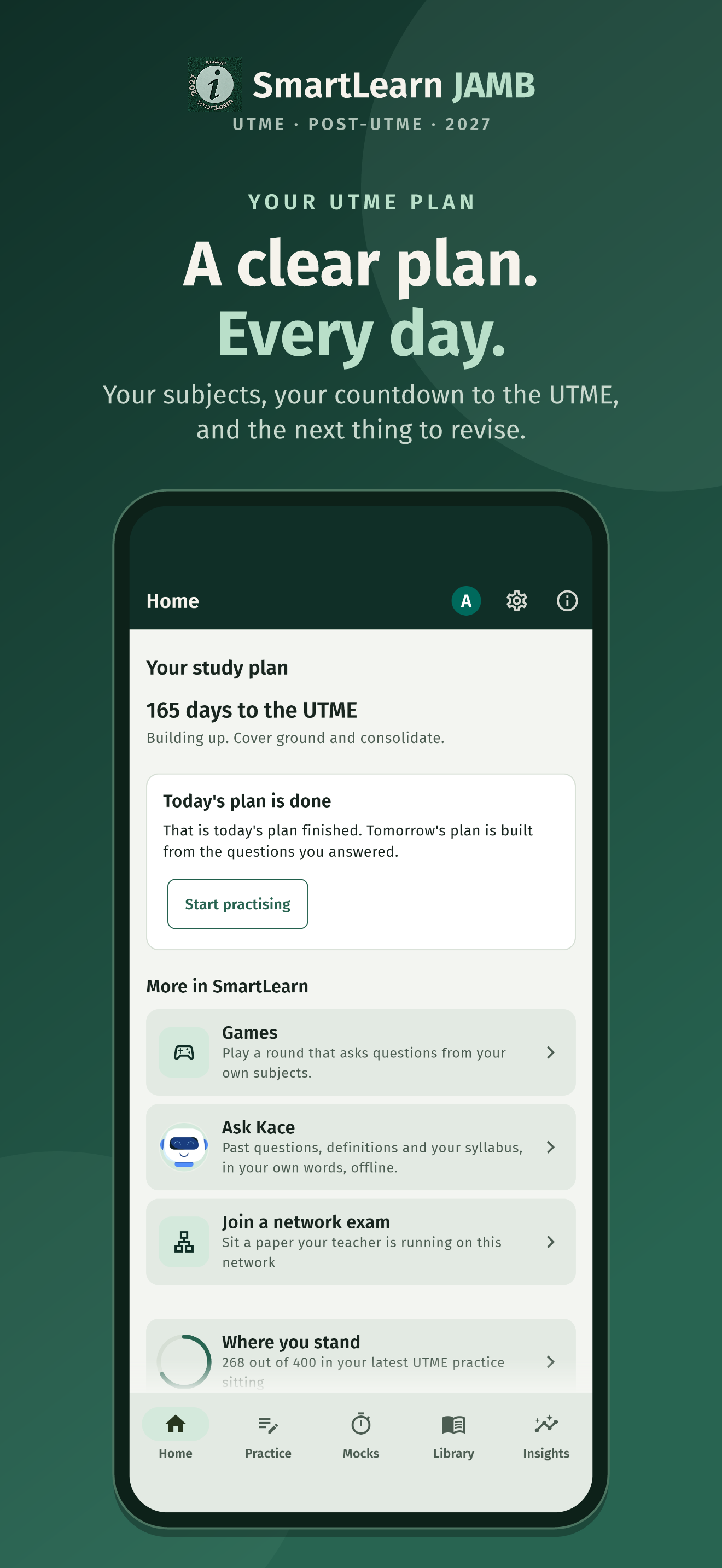
A plan for today Your study plan and saved practice, ready to continue in the green-themed 2027 app. -
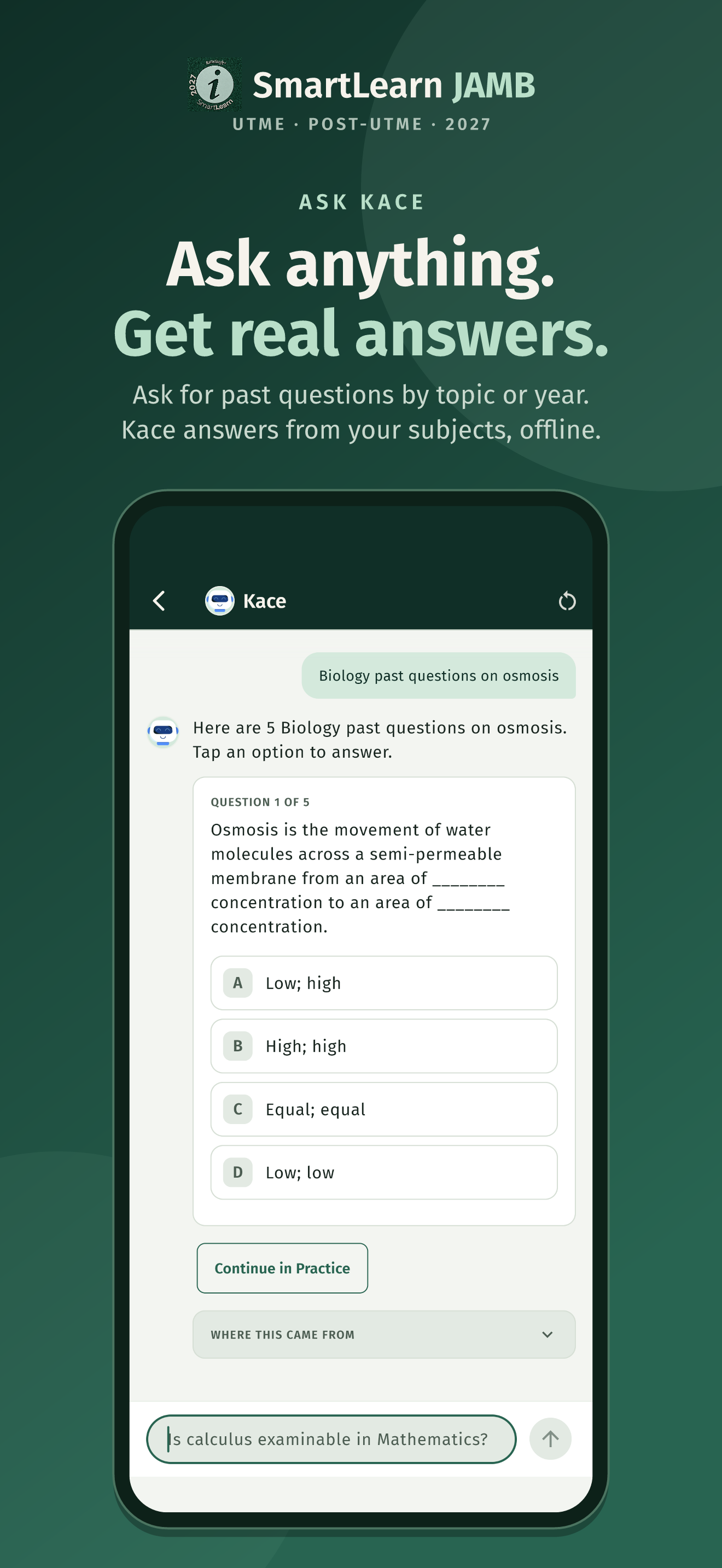
Ask Kace The offline study assistant helps you find answers in installed reference content. -
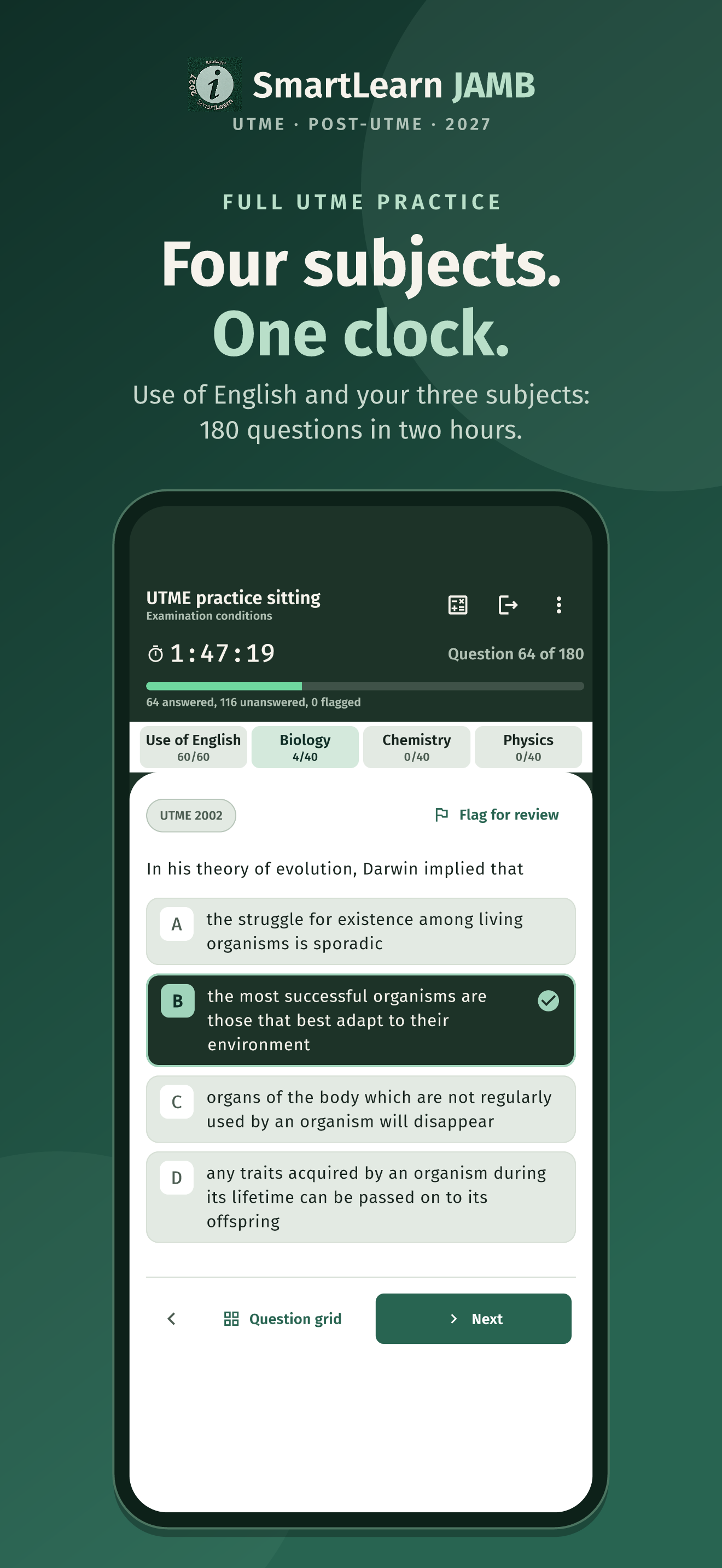
Rehearse a UTME sitting Practise a timed sitting with Use of English and three subjects, with question navigation and flag-for-review tools.
The network exam, priced
One local network, a room full of candidates.
Host the sitting in SmartLearn JAMB on Windows or Mac. Candidates join the Exam Room in a browser on the same local network. Buy the number of seats you need; the current minimum is shown with the seat price.
- The Network Exam is a feature of SmartLearn JAMB, unlocked by its own seat licence
- A Windows or Mac host serves the sitting over your local WiFi or wired network
- Candidates join in a browser; the local sitting needs no public internet connection
Sign in and confirm your email to buy. Choose your seat quantity in the checkout, subject to the listed minimum.
Contact sales if your institution needs an invoice or purchase order arranged before buying.
- 01 The host prepares the subjects and starts the sitting
- 02 Candidates join the Exam Room on the same local network
- 03 The host ends the sitting and releases the results
The host keeps control of the sitting and its results.
- These seat prices are for the SmartLearn JAMB 2027 edition.
- Network Exam seats are a separate licence and do not receive the desktop upgrade discount.
- An activated 2026 Network Exam licence on the same Windows computer may qualify for a new standard desktop upgrade; it does not discount new Network Exam seats.
When something goes wrong
Questions we get asked.
And the answers we give, in the words we would use on the phone. If yours is not here, it reaches a person.
01 Is this a different app?
It is the next major version of SmartLearn JAMB: 2026 desktop version 11.0.1 continues as the 2027 edition, version 12.0.0. The refreshed green design keeps the focus on UTME and Post-UTME preparation.
02 Can I keep my previous profile and results?
On Windows, the legacy import flow can bring supported profiles and results from the previous desktop installation. It keeps the previous name where available, with an option to change it.
03 Who qualifies for the half-price upgrade?
For this cycle, the immediately previous 2026 desktop edition must be installed and activated on the same Windows computer. Enter only the new upgrade code. An activated 2026 Network Exam licence can qualify for a standard desktop upgrade, but Network Exam seats, mobile and bundles do not receive this discount.
04 Does it work without internet?
Installed questions, explanations, saved practice and the offline assistant work locally. Sign-in, activation, store purchases, restore and downloading new content require an internet connection.
05 Can a school run a whole-class network exam?
Yes. Host from the Windows or Mac app on the same local network as the candidates. The separate Network Exam licence supplies the seats you purchase; candidates join through the browser Exam Room.
06 Do two learners need two licences on one computer?
The app keeps separate local learner profiles and results within one installation. Licences apply to the activated device, rather than each local profile.
Say which product, which machine and what it said. Most questions are one of the ones here; the rest we would rather hear about before the day than on it.
Install once, with every pack included.


-
SmartLearn JAMB 2027 for Windows, with all packs Recommended Recommended. The app and all 47 packs in one installer: 25 UTME subjects, 18 Post-UTME collections and four free packs. Packs prepare automatically when the app opens. Sign in and activate this device to unlock paid content.Download SmartLearn JAMB 2027 for Windows, with all packs 12.1.0 (40) for Windows, 529.3 MB
-
SmartLearn JAMB 2027 for Mac, with all packs Recommended Recommended. The app and all 47 packs in one installer: 25 UTME subjects, 18 Post-UTME collections and four free packs. Packs prepare automatically when the app opens. Sign in and activate this device to unlock paid content.Download SmartLearn JAMB 2027 for Mac, with all packs 12.1.0 (40) for macOS, 521.6 MB
-
SmartLearn JAMB 2027 for Windows (app only) Smaller download with the free sample. Add packs from Library, individual files or the all-packs ZIP. Paid content requires activation.Download SmartLearn JAMB 2027 for Windows (app only) 12.1.0 (40) for Windows, 88.3 MB
-
SmartLearn JAMB 2027 for Mac (app only) Smaller download with the free sample. Add packs from Library, individual files or the all-packs ZIP. Paid content requires activation.Download SmartLearn JAMB 2027 for Mac (app only) 12.1.0 (40) for macOS, 80.7 MB
-
SmartLearn JAMB 2027 for Android (APK) Android 7.0 or later, 64-bit. Includes the free sample; download subject packs in Library. APK updates must come from the same download channel; Google Play signs its own delivery.Download SmartLearn JAMB 2027 for Android (APK) 12.1.0 (40) for Android, 101.5 MB
All packs, together or one at a time
The recommended Windows and Mac installers include all 47 packs: 25 UTME subjects, 18 Post-UTME collections and four free packs. A brief connection is still needed to sign in and activate paid content on each device.
-
All 47 JAMB packs (ZIP) Extract once, then select the .sljpack files in Library > Install packs. Includes UTME, Post-UTME and free reference packs. Paid content requires activation.Download All 47 JAMB packs (ZIP) 2026112301 for Any device, 441.2 MB
For an existing installation, extract the ZIP, open Library → Install packs, and select the .sljpack files. You can copy these files by USB to another computer. Copying a pack does not copy activation.
Free packs14.6 MB
-
JAMB admissions brochure Free reference content.Download JAMB admissions brochure 2026102003 for Any device, 5.2 MB
-
WordNet 3.0 — Princeton University Free reference content.Download WordNet 3.0 — Princeton University 2026102003 for Any device, 7.7 MB
-
SmartLearn JAMB free sample Free reference content.Download SmartLearn JAMB free sample 2026112301 for Any device, 532 KB
-
JAMB UTME Syllabus (IBASS e-syllabus) Free reference content.Download JAMB UTME Syllabus (IBASS e-syllabus) 2026102003 for Any device, 1.2 MB
All 25 UTME subject packs301.3 MB
-
Agricultural Science Encrypted content; activation is required on each device.Download Agricultural Science 2026112301 for Any device, 12.5 MB
-
Arabic Encrypted content; activation is required on each device.Download Arabic 2026112301 for Any device, 1.9 MB
-
Biology Encrypted content; activation is required on each device.Download Biology 2026112301 for Any device, 20.6 MB
-
Chemistry Encrypted content; activation is required on each device.Download Chemistry 2026112301 for Any device, 19.2 MB
-
Christian Religious Studies Encrypted content; activation is required on each device.Download Christian Religious Studies 2026112301 for Any device, 17.2 MB
-
Commerce Encrypted content; activation is required on each device.Download Commerce 2026112301 for Any device, 10.9 MB
-
Computer Studies Encrypted content; activation is required on each device.Download Computer Studies 2026112301 for Any device, 3.4 MB
-
Economics Encrypted content; activation is required on each device.Download Economics 2026112301 for Any device, 17.1 MB
-
Use of English Encrypted content; activation is required on each device.Download Use of English 2026112301 for Any device, 42.8 MB
-
Principles of Accounts Encrypted content; activation is required on each device.Download Principles of Accounts 2026112301 for Any device, 16.5 MB
-
Fine Arts Encrypted content; activation is required on each device.Download Fine Arts 2026112301 for Any device, 3.2 MB
-
French Encrypted content; activation is required on each device.Download French 2026112301 for Any device, 3.9 MB
-
Mathematics Encrypted content; activation is required on each device.Download Mathematics 2026112301 for Any device, 23.6 MB
-
Geography Encrypted content; activation is required on each device.Download Geography 2026112301 for Any device, 19.8 MB
-
Government Encrypted content; activation is required on each device.Download Government 2026112301 for Any device, 15.8 MB
-
Hausa Encrypted content; activation is required on each device.Download Hausa 2026112301 for Any device, 3.1 MB
-
History Encrypted content; activation is required on each device.Download History 2026112301 for Any device, 5.4 MB
-
Home Economics Encrypted content; activation is required on each device.Download Home Economics 2026112301 for Any device, 3.6 MB
-
Igbo Encrypted content; activation is required on each device.Download Igbo 2026112301 for Any device, 3.1 MB
-
Islamic Studies Encrypted content; activation is required on each device.Download Islamic Studies 2026112301 for Any device, 9.5 MB
-
Literature in English Encrypted content; activation is required on each device.Download Literature in English 2026112301 for Any device, 18.5 MB
-
Music Encrypted content; activation is required on each device.Download Music 2026112301 for Any device, 765 KB
-
Physical and Health Education Encrypted content; activation is required on each device.Download Physical and Health Education 2026112301 for Any device, 3.6 MB
-
Physics Encrypted content; activation is required on each device.Download Physics 2026112301 for Any device, 21.2 MB
-
Yoruba Encrypted content; activation is required on each device.Download Yoruba 2026112301 for Any device, 4.2 MB
All 18 Post-UTME collections125.3 MB
-
POST-UTME: ABU Encrypted content; activation is required on each device.Download POST-UTME: ABU 2026112301 for Any device, 11.5 MB
-
POST-UTME: BUK Encrypted content; activation is required on each device.Download POST-UTME: BUK 2026112301 for Any device, 7.4 MB
-
POST-UTME: FUTA Encrypted content; activation is required on each device.Download POST-UTME: FUTA 2026112301 for Any device, 7.2 MB
-
POST-UTME: FUTO Encrypted content; activation is required on each device.Download POST-UTME: FUTO 2026112301 for Any device, 3.5 MB
-
POST-UTME: NDU Encrypted content; activation is required on each device.Download POST-UTME: NDU 2026112301 for Any device, 4.9 MB
-
POST-UTME: OAU Encrypted content; activation is required on each device.Download POST-UTME: OAU 2026112301 for Any device, 8.0 MB
-
POST-UTME: OTHER Encrypted content; activation is required on each device.Download POST-UTME: OTHER 2026112301 for Any device, 13.3 MB
-
POST-UTME: RSUST Encrypted content; activation is required on each device.Download POST-UTME: RSUST 2026112301 for Any device, 1.8 MB
-
POST-UTME: UI Encrypted content; activation is required on each device.Download POST-UTME: UI 2026112301 for Any device, 3.6 MB
-
POST-UTME: UNIBEN Encrypted content; activation is required on each device.Download POST-UTME: UNIBEN 2026112301 for Any device, 9.5 MB
-
POST-UTME: UNICAL Encrypted content; activation is required on each device.Download POST-UTME: UNICAL 2026112301 for Any device, 4.0 MB
-
POST-UTME: UNILAG Encrypted content; activation is required on each device.Download POST-UTME: UNILAG 2026112301 for Any device, 10.4 MB
-
POST-UTME: UNILORIN Encrypted content; activation is required on each device.Download POST-UTME: UNILORIN 2026112301 for Any device, 7.5 MB
-
POST-UTME: UNIPORT Encrypted content; activation is required on each device.Download POST-UTME: UNIPORT 2026112301 for Any device, 8.5 MB
-
POST-UTME: UNIUYO Encrypted content; activation is required on each device.Download POST-UTME: UNIUYO 2026112301 for Any device, 4.9 MB
-
POST-UTME: UNIZIK Encrypted content; activation is required on each device.Download POST-UTME: UNIZIK 2026112301 for Any device, 12.1 MB
-
POST-UTME: UNN Encrypted content; activation is required on each device.Download POST-UTME: UNN 2026112301 for Any device, 5.3 MB
-
POST-UTME: YABATECH Encrypted content; activation is required on each device.Download POST-UTME: YABATECH 2026112301 for Any device, 1.9 MB
SHA-256 checksums
- JAMB admissions brochure
772af8e75cdf73998b7d9539ba6f3ca4457b275c9ea00d467d5bb00c1063ef02 - Agricultural Science
4df8a27e1ceca0e891e3b1215cddc817257ed3949ead682d80a70e7ef1caa8c4 - Arabic
55953f60c672a7a9ee0412234d56b98e122700df5e176bfaa0b50be869917b88 - Biology
8b9e8d7346ee32e9f2f96546c4639139b75c3267f40082a830edbc1dab1e7d6b - Chemistry
c3195aaea17f31a157aae931d6a73cd187a3b29536c98e31f596b6f02c3a621e - Christian Religious Studies
a77353afdf97d2ef68c94b7799fa7c72e21ac11edf4676b310e2e614cc65d3c6 - Commerce
b97ede10d3526155e797d0fb58866a2aa40c7dbe70cc15185304d7bd9ad36667 - Computer Studies
a8ec0ffc474b3f2bc6917031d636b244810edecbae8c3fb88f6d724c439fb8ba - WordNet 3.0 — Princeton University
1e37b4f736d7c7e13351320cd56afb2d9ee89bd37c5e2dfddc4f20f660cd4564 - Economics
8b0c8ffc5303bdc052ea3a2d377dfd2e17056465c9376e97e8062f42f5925eef - Use of English
e37e3f3325381b550cafcd6d9044a64165f7d546be7d82636fbd619b6ba8f0a7 - Principles of Accounts
3d3ebd704686f448029168d4a35d2b78cf7a2eb7ba66c9b75fd49bd9b95ebc0a - Fine Arts
e5e7a2ca7ec397e445e2568a2b114ec7824b970a4214e66d7ab3bfa72d9ba753 - French
bb1234aa302f4daf61d0b4904bd35c53a4244ae93425ceff7ce68b0691b7901d - Mathematics
6be23904c402f99ae8ca0a59dff7ebb55e7d40cb07da35efeb7bee52a2f33dac - Geography
36c04d599f1baace51026b954c73d45dd951cb4577523e3c45e5a58f6594821e - Government
d121fc1ed8d08ea92696b30ab256186bbdc7548addf3e15f4662cba591cac060 - Hausa
e33b16938d9c79aa0d58998f359b7729524c65d76062818c337cf6bbb27329c0 - History
b7fe19d24f99732bda320cd5555015d17beaf3eb62546aed21a2765673f2cc40 - Home Economics
15633a1ab48dd4dc833ca1a3d33406a6031dd89538d9f1c57119b009ed6574ca - Igbo
ef92321978e37b7a82ad114a29671dfdf7423c5fafd7edcebed00fce81056c56 - Islamic Studies
980603789984ad077aa443a42b27e90086e2abf7cf407576d82ab09a32364912 - Literature in English
28edbf46e0683ebccbbba6c1a741e913997863428f20fd69b1c61e29770eaeb5 - Music
0300a28f7a665f3da8a82de5e48c0bb6919cc742fcbaa176bde760c101920c47 - Physical and Health Education
0ee992ad91c9c8de8250cac8d7d2aee7f26821b576e5e7f4b9820dc39b7e607c - Physics
e54e032267d568a912c64948c7add645bafbb80d247167012ab5afe1cf26a2de - POST-UTME: ABU
2b11ecf960a3ab16afe766fcf9960d095ee394cc623132fa694d5e93f386432b - POST-UTME: BUK
5e8396ebb9eb1a65a1b5ea2f6e3846de0aed88fce87d6dc2e14d12db89afd05f - POST-UTME: FUTA
fc192458f2d124565344c4a37d9984269a7232533887fcf12c3772ce22bf469a - POST-UTME: FUTO
967a595a6500c60c31ac0d7c29a2e85f183b55b7442a18b23e9174de34285ff1 - POST-UTME: NDU
003a7c274e05369ec717fd3a30f43e2840afd34ad56c7a8daa644a8192786282 - POST-UTME: OAU
c871c06a2b95649c3ba03a29c2cdb3cbbb77a4bc408cd55bfd5e582ec66bfbca - POST-UTME: OTHER
f7cb2861671ed94764b5d1233a1cfa124bccab7e68f0f08ce3cd688420635614 - POST-UTME: RSUST
6947cc0db18764565007e514a628ac1a77d505f87dd841199b142b81c805cabd - POST-UTME: UI
3814956c5732e4cfbd1f67681339882071e262394c5e790a84d25442d524adb5 - POST-UTME: UNIBEN
f128335eec5740e84d58749fffcaffda8d30fd9a6b40c9dde16e5d849687ba43 - POST-UTME: UNICAL
4af81805a4c11bd788a38be0d1fa29fa3b11725e29102aed28517d6a3933cd6f - POST-UTME: UNILAG
34eebe06d9007ae9ef47eb0203d0cfdf16585d5a16630f8b5e857c2f5987dc8c - POST-UTME: UNILORIN
8926ea91af998323dbd2e0b1fd45619b8ee6af64c17f69eded491d9c0ef784c1 - POST-UTME: UNIPORT
a5cc21efe63390bf6b657b6e6787be806fc26aca9bfb2a0fd4430ca3dcf2b8ca - POST-UTME: UNIUYO
f538c4b261eadf5a3815bcd3fbe23a8b93da94fb2e100190e9f49f6dc1df7174 - POST-UTME: UNIZIK
bb2d224e189ada7875a696faf6887bf6f8e150c081894042bf1d5e9fa90fa2ff - POST-UTME: UNN
3a2612dcf9dcd2c9d14ad60d2887d7a29a1887503cc9f02ed1b94a07a9a75eb1 - POST-UTME: YABATECH
3cef10092be0837dcfb436bf861500b32430f813bc34212cbbe46ec11ae81e8d - SmartLearn JAMB free sample
6a1652025595bf39c1a5e7bda3c413eb87356c363512cd1617829f90fbdbc9bc - JAMB UTME Syllabus (IBASS e-syllabus)
07913ea684d756e6bef60c14e7fb8460abebbf10116c4b0951f1cb236568708d - Yoruba
a45bb1bda1e6ac61aa55db4e0ec8e9b91d6dff17bfa07494134497d90f9a3dbd - All 47 JAMB packs (ZIP)
97118a65b0e6bba95e07aebc50a841350e5c0d906bd9539b03276331f0d19901
-
 SmartExaminer
Computer-based tests in your own hall, on your own network.
See SmartExaminer
-
 SmartLearn WAEC
The WASSCE exam hall, at home. Objectives and theory, marked, with no data.
See SmartLearn WAEC
-
 SmartSkool
Offline-first school management that does not stop when the line does.
See SmartSkool
Judge the software, not the slide
Download SmartLearn JAMB.
Then try it on your own machines.
Installers are free to download and a licence unlocks them. Tell us what you are running and how many people it has to serve, and we will say which licence fits — from the software, not from a brochure.
Or compare the whole family first.